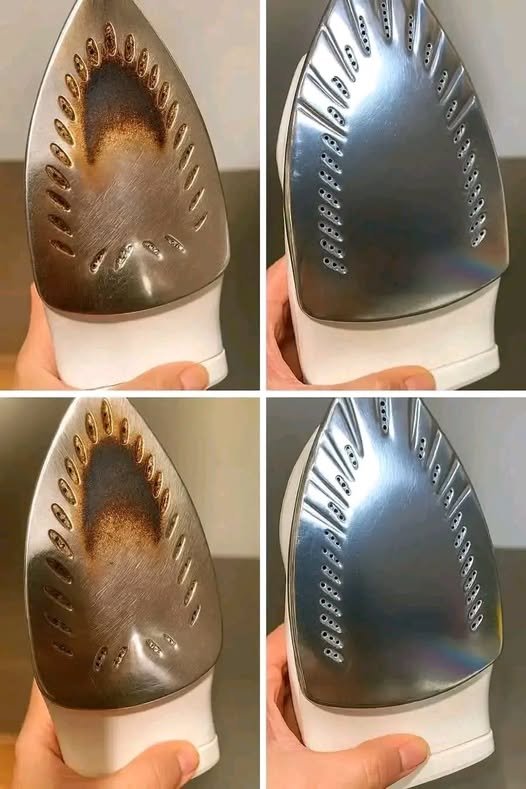
How to Clean Your Iron Thoroughly (Inside and Out)
A clean iron glides better, produces cleaner steam, and helps prevent stains on clothing. The process can be as quick as 30 seconds for light cleaning or 15–20 minutes for a deep clean.
What You’ll Need
For basic cleaning:
- Soft microfiber cloth
- Cotton swabs
- Distilled water
For deeper cleaning:
- Baking soda
- White vinegar
- Old towel
- Toothpick (wooden, not metal)
Part 1: Clean the Soleplate (Bottom of the Iron)
The soleplate collects:
- Burnt fabric residue
- Starch buildup
- Melted synthetic fibers
- Mineral deposits
Method 1: Baking Soda Paste
Make the Paste
Mix:
- 2 tablespoons baking soda
- 1 tablespoon water
until a thick paste forms.
Apply
- Ensure the iron is unplugged and completely cool.
- Spread the paste on the soleplate.
- Avoid getting paste into steam holes.
Let sit for:
- 2–3 minutes
Wipe Clean
Use a damp microfiber cloth.
Rub gently until residue is removed.
Clean Steam Holes
Use cotton swabs to remove any remaining paste around the steam vents.
Part 2: Remove Mineral Buildup Inside the Iron
If steam output is weak or the iron spits brown water, minerals may be clogging the system.
Vinegar Cleaning Method
Fill Reservoir
Mix:
- ½ cup white vinegar
- ½ cup distilled water
Fill the water tank halfway.
Heat Iron
Turn the iron to:
- Highest steam setting
Allow it to fully heat.
Steam
Hold the iron over a sink or old towel.
Press the steam button repeatedly for:
- 3–5 minutes
Mineral deposits may begin flushing out.
Empty
Turn off the iron.
Allow it to cool slightly.
Empty the tank completely.
Rinse
Fill with distilled water.
Steam again for:
- 1–2 minutes
Repeat if necessary.
This removes remaining vinegar and loosened minerals.
Part 3: Clean the Steam Vents
Steam holes often trap:
- Limescale
- Starch
- Fabric fibers
Procedure
- Dip a cotton swab in white vinegar.
- Gently clean each steam hole.
- Use a wooden toothpick to loosen stubborn deposits.
Important
Never use:
- Metal pins
- Needles
- Paper clips
These can scratch the soleplate and damage steam channels.
Part 4: Remove Burn Marks
If the soleplate has dark scorch marks:
Salt Method
- Place a sheet of parchment paper on a flat surface.
- Sprinkle a thin layer of salt.
- Heat the iron to a medium setting with steam off.
- Glide the iron over the salt several times.
The salt helps lift residue from the soleplate.
Part 5: Clean the Water Reservoir
Many people forget this step.
Simple Reservoir Cleaning
- Fill halfway with distilled water.
- Shake gently.
- Empty completely.
Repeat several times.
This helps remove loose mineral particles.
Part 6: Use the Self-Clean Feature
Many modern irons include a self-clean button.
Refer to your owner’s manual, but generally:
- Fill with water.
- Heat to maximum temperature.
- Unplug.
- Hold over a sink.
- Press and hold Self-Clean.
Hot water and steam will flush debris from the system.
Prevent Future Buildup
Use Distilled Water
In hard-water areas, distilled water greatly reduces mineral deposits.
Empty After Every Use
After ironing:
- Turn off the iron.
- Empty the reservoir.
- Leave the cap open until dry.
This prevents standing water from creating deposits.
Avoid Excess Starch
Heavy starch sprays can leave residue on the soleplate.
If you use starch frequently, wipe the soleplate after each ironing session.
Quick 30-Second Maintenance Routine
After each use:
- Unplug the iron.
- Let it cool slightly.
- Wipe the soleplate with a damp microfiber cloth.
- Empty the water tank.
- Store upright.
Doing this consistently can prevent most deep-cleaning problems.
Common Mistakes to Avoid
❌ Steel wool or abrasive scrubbers
❌ Knives or metal tools on the soleplate
❌ Bleach-based cleaners
❌ Leaving water in the reservoir for weeks
❌ Using undiluted harsh chemicals inside the steam system
Signs Your Iron Needs Cleaning
- Brown spots on clothes
- Weak steam output
- Water leaking from vents
- Sticky soleplate
- Iron dragging instead of gliding
- White mineral flakes coming out of steam holes
A quick wipe after each use and a deep clean every few months can keep most irons working smoothly for years.