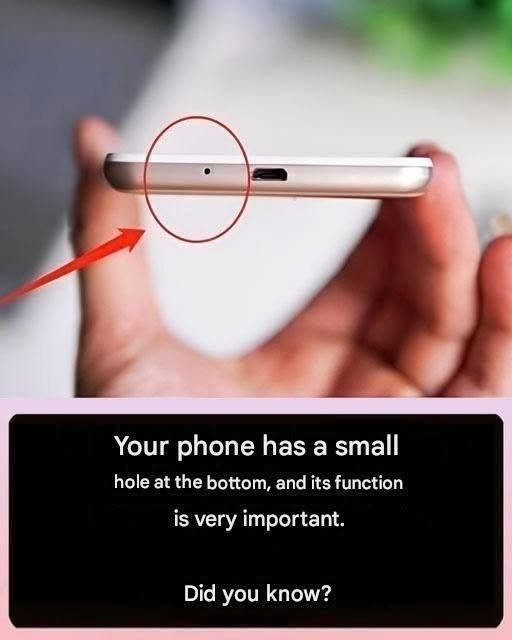
Take a close look at the bottom of your smartphone. Right beside the charging port, you’ll probably notice a tiny circular hole. It’s so small that most people never give it a second thought. Some assume it’s a hidden reset button, while others mistake it for part of the speaker or even the SIM card tray.
The truth is, this tiny opening plays a critical role in how your phone works every single day.
If you’ve ever wondered what that little hole is for—and why you should never stick a pin or paperclip into it—you’re about to find out.
The Tiny Hole Is Usually Your Phone’s Primary Microphone
Despite its size, the small hole next to the charging port typically houses your smartphone’s primary microphone. This microphone captures your voice whenever you:
- Make phone calls
- Record voice notes
- Send voice messages
- Join video meetings
- Record videos
- Use voice assistants like Siri or Google Assistant
- Dictate text messages
Without this microphone, the person on the other end of a call might not hear you clearly—or at all.
The opening itself isn’t the microphone. It’s simply an acoustic port that allows sound waves to reach the sensitive microphone hidden safely inside the phone.
Why Is the Hole So Small?
Many people wonder why manufacturers don’t simply make the microphone opening larger.
The answer is simple: a tiny opening helps protect the delicate microphone from:
- Dust
- Dirt
- Pocket lint
- Moisture
- Small debris
Engineers carefully design the size and position of the hole to capture sound efficiently while minimizing the risk of damage.
Modern Smartphones Usually Have More Than One Microphone
You might be surprised to learn that your smartphone probably contains multiple microphones.
Most modern devices include:
- A primary microphone near the charging port
- A secondary microphone near the top of the phone
- Additional microphones near the camera system on some premium models
These microphones work together to improve audio quality.
For example, while you’re talking on a busy street, one microphone captures your voice while another listens to surrounding noise. The phone’s software then reduces background sounds, making your voice easier to hear.
This technology is called noise cancellation, and it’s one reason phone calls today sound much clearer than they did years ago.
Why You Should Never Insert a Pin Into That Hole
One of the most common smartphone mistakes is poking that tiny hole with a SIM ejector tool or paperclip.
Many people believe it’s a hidden reset button similar to those found on older electronic devices.
Unfortunately, inserting anything into the microphone port can permanently damage the microphone inside.
Avoid using:
- Needles
- Safety pins
- Toothpicks
- Paper clips
- SIM ejector tools
- Sewing needles
Even gentle pressure can puncture the protective mesh or damage the sensitive microphone component beneath it.
Signs Your Microphone May Be Blocked
Over time, lint and dust can accumulate around the microphone opening.
Common symptoms include:
- People saying they can’t hear you during calls
- Muffled voice recordings
- Voice assistants not recognizing commands
- Poor audio quality in videos
- Voice messages sounding unusually quiet
Before assuming the microphone is broken, check whether the opening is clogged with dirt.
How to Clean the Microphone Safely
Fortunately, cleaning the microphone is simple if done correctly.
Here are the safest methods:
1. Use a Soft Brush
A clean, soft-bristled brush can gently remove dust from the opening.
2. Use Gentle Air
Blowing gently across the hole may help dislodge loose debris. Avoid using high-pressure compressed air, as it can force particles deeper into the phone.
3. Keep the Phone Clean
Regularly wiping your phone with a soft microfiber cloth helps reduce dirt buildup around all openings.
4. Avoid Liquids
Never spray cleaning products directly into the microphone hole. Moisture can damage internal components.
Is It Water-Resistant?
Many modern smartphones include water-resistance ratings such as IP67 or IP68. This means the microphone is protected against accidental splashes and brief water exposure.
However, water resistance doesn’t make a phone waterproof.
Saltwater, soap, chlorinated water, or other liquids can still damage the microphone over time.
If your phone gets wet:
- Dry the exterior with a soft cloth.
- Let it air dry before charging.
- Avoid using heat sources like hair dryers.
What If the Microphone Stops Working?
If cleaning doesn’t solve the problem, try these steps:
- Restart your phone.
- Check for software updates.
- Test the microphone using the built-in voice recorder.
- Remove any case that may block the microphone opening.
- Contact the manufacturer’s support or visit an authorized repair center if the issue continues.
Other Tiny Holes on Your Phone
Not every small hole on a smartphone serves the same purpose.
Depending on the model, small openings may be used for:
- Secondary microphones
- Noise cancellation microphones
- Speaker vents
- Pressure equalization
- Barometric sensors (on some devices)
Always check your phone’s user manual before inserting any tool into a small opening.
Frequently Asked Questions
Is the hole next to the charging port a reset button?
No. On most modern smartphones, it is the primary microphone, not a reset button.
Can I clean it with a pin?
No. Sharp objects can permanently damage the microphone. Use a soft brush or microfiber cloth instead.
Why do some phones have several tiny holes?
Many smartphones use multiple microphones for improved call quality, video recording, and noise cancellation.
Will a blocked microphone affect calls?
Yes. Dirt or lint can make your voice sound muffled or very quiet during phone calls and recordings.
Final Thoughts
That tiny hole beside your smartphone’s charging port may look insignificant, but it’s one of the hardest-working parts of your device. Hidden behind it is the primary microphone, allowing you to make calls, record videos, send voice messages, and interact with digital assistants every day.
The next time you notice that tiny opening, remember that it’s not a reset button or a design detail—it’s an essential part of your phone’s communication system. Treat it with care, avoid inserting sharp objects, and clean it gently when needed. A little attention can help ensure crystal-clear audio and keep your smartphone performing at its best for years to come.
Disclaimer: The exact location and function of small holes may vary by smartphone model and manufacturer. If you’re unsure about your device, consult the user manual or the manufacturer’s support resources before attempting to clean or inspect any openings.